1. Your first picture in twenty lines
Before any theory, make something. This chapter draws Minar-e-Pakistan at sunset with a kite beside it, as two frames that swing back and forth, in 23 lines of Python. Each step below says what the programmer is thinking, then shows the code that follows from the thought. The only library is Pillow, which Colab and Anaconda already include. The whole script, tiny_minar.py, is these steps joined together; it saves the animation to ../out/tiny_minar.gif, so either make that folder or change the last line.
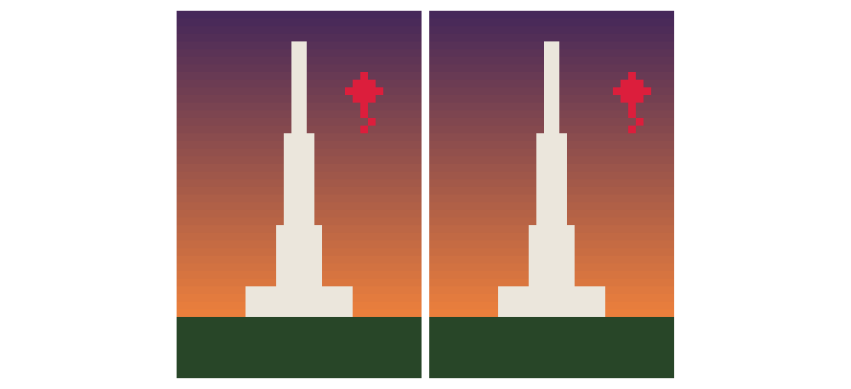
Figure 1.1. The two frames the script makes, side by side, enlarged eight times. Only the kite moves, two pixels to the right; shown alternately every 0.4 seconds, it seems to sway in the wind.
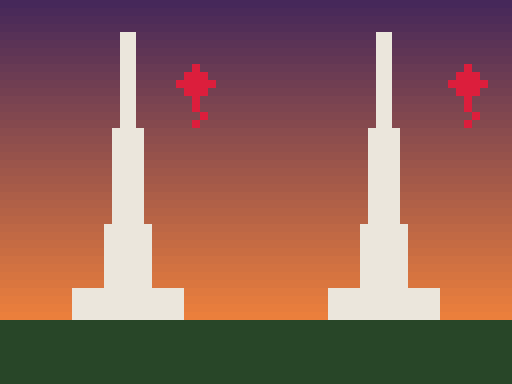
Watch the result: the animated GIF.
1.1 Choose the subject: one idea
Thinking: “Which Lahore landmark can I recognise from a single rule?” Badshahi Masjid needs domes, arches and symmetry; a street in the Walled City needs perspective. Minar-e-Pakistan is almost one idea: a white tower that gets narrower as it rises. Starting with the simplest recognisable shape is how most pixel artists begin; detail is added only once the silhouette reads.
1.2 Step 1: the canvas
Thinking: “How small can it be and still read as the Minar? A tower is tall and thin.”
from PIL import Image
W, H = 32, 48
A small canvas forces decisions: at 32 pixels wide there is no room for detail that does not matter.
1.3 Step 2: the palette
Thinking: “Sunset over Iqbal Park. How few colours can I use?” Five: two for the sky, one for the tower, one for grass, one for the kite.
SKY_TOP, SKY_LOW, MINAR, GRASS, KITE = (70, 40, 90), (240, 130, 60), (235, 230, 220), (40, 70, 40), (220, 30, 60)
Each colour is three numbers from 0 to 255: how much red, green and blue light. There are two easy places to get colours:
-
From a photo. Open your own photograph of the place in any image editor, or a web colour picker, click the sky, the stone and the grass, and copy the three numbers it shows.
-
From a palette library. Pixel artists share ready-made palettes; the Lospec palette list (lospec.com/palette-list) has thousands, searchable by number of colours. Borrowing a tested palette is normal practice and a good way to learn which colours sit well together.
The physics behind the colours. Why is a sunset sky orange near the horizon and purple above? Sunlight contains every colour. Air molecules scatter short waves (blue) much more than long ones (red): this is Rayleigh scattering, and its strength rises as one over the wavelength to the fourth power, so blue light near 450 nm is scattered about four times as strongly as red light near 650 nm. At midday the light’s path through the air is short, and the scattered blue fills the sky. At sunset the light crosses many times more air to reach you; most of the blue is scattered out of the beam on the way, and what arrives near the horizon is orange and red. Higher up the sky is lit by light that has crossed less air, hence the darker purple. Our two sky colours are that physics, chosen by eye.
1.4 Step 3: the sky as a blend
Thinking: “Fade from purple at the top to orange at the horizon. How far down a pixel is decides how much of each.”
t = y / 40
c = tuple(int(a + (b - a) * t) for a, b in zip(SKY_TOP, SKY_LOW))
The number t is 0 at the top row and 1 at the horizon (row 40). For each of red, green and blue, the colour is the top value plus the fraction t of the way to the bottom value. This is linear interpolation, often called lerp, and it is the most reused idea in animation: blending colours, positions and sizes all work this way.
1.5 Step 4: the tower from one rule
Thinking: “It is a tower that narrows as it rises. If I give its half-width as a function of height, the shape draws itself.”
half = (y - 4) / 12
if 4 <= y < 40 and abs(x - 15.5) <= half + 0.5:
    c = MINAR
if 36 <= y < 40 and abs(x - 15.5) <= 7:
    c = MINAR
The tower starts at row 4 and grows by one pixel on each side every twelve rows down. abs(x - 15.5) is the distance of a pixel from the centre line, so the test distance from centre \(\le\) half-width is the tower. The second test adds the wide platform the Minar stands on. Notice the tower comes out in steps, not a smooth slope: at this size, one more pixel of width is the smallest change possible. That staircase is part of the 8-bit look.
1.6 Step 5: the ground
Thinking: “Everything below the horizon is grass.”
if y >= 40:
    c = GRASS
img.putpixel((x, y), c)
The order of the tests matters: later tests overwrite earlier ones, so the sky is the default, the tower is painted over it, and the ground over both. Painting from back to front like this is called the painter’s algorithm.
1.7 Step 6: the kite as a sprite
Thinking: “A kite (patang) is a diamond with a tail. I will list its pixels once and stamp it wherever I want.”
PATANG = ((0, -2), (-1, -1), (0, -1), (1, -1), (-2, 0), (-1, 0), (0, 0), (1, 0), (2, 0), (-1, 1), (0, 1), (1, 1), (0, 2))
for dx, dy in PATANG + ((0, 3), (1, 4), (0, 5)):
    img.putpixel((kite_x + dx, 10 + dy), KITE)
A small shape stored as a list of offsets from its centre is a sprite. To draw it elsewhere, change kite_x. A first attempt with only five pixels looked like a cross, not a kite: at this size, a shape needs enough pixels for its silhouette to read, and testing by eye is part of the work.
1.8 Step 7: motion from two frames
Thinking: “Something only needs to swing to look alive. Two positions, shown in turn, are enough.”
frames = [frame(24), frame(26)]
frames[0].save("../out/tiny_minar.gif", save_all=True, append_images=frames[1:], duration=400, loop=0)
The function frame(kite_x) draws the whole picture with the kite at a given column; the two frames differ only in that number. The GIF shows each for 400 milliseconds and loops for ever. The physics behind the swing: a kite on a string in a gusty wind sways like a pendulum about its resting point. Two frames are the crudest possible sample of that motion, and the eye fills in the rest. Chapter 5 computes the real motion from the forces.
1.9 Step 8: enlarge without blurring
Thinking: “At 32 by 48 it is a postage stamp. Make it bigger, but keep the pixels square.”
return img.resize((W * 8, H * 8), Image.NEAREST)
NEAREST (nearest-neighbour resampling) copies each pixel into an 8 by 8 block. Smooth resampling would average neighbouring pixels and blur the edges, losing the pixel-art look.
1.10 What to try next
-
Change
SKY_TOPandSKY_LOWto midday blue and white, and see how the mood changes. -
Change 12 in the tower rule to 8 or 20, and watch the taper.
-
Add a third frame,
frame(25), between the two, and the swing becomes smoother. -
Draw the Walled City’s rooftops along the bottom: rectangles of random heights, one random number per house.
The rest of the guide takes each of these ideas (pixels, palettes, blending, shapes from rules, sprites, frames, physics) and builds them up properly, ending with Badshahi Masjid in a full day-and-night film.