2. Branches, tags and going back
2.1 Branches
A branch is a separate line of work, which lets you try something without touching your working version.
git switch -c idea       # make a branch and move to it
## ... work and commit ...
git switch main          # go back
git merge idea           # bring the work in
What you should see
$ git switch -c idea
Switched to a new branch 'idea'

$ git commit -m "Add the median"
[idea 9b0de38] Add the median
 1 file changed, 1 insertion(+)

$ git switch main
Switched to branch 'main'

$ git merge idea
Updating 3545826..9b0de38
Fast-forward
 results.txt | 1 +
 1 file changed, 1 insertion(+)
If two branches changed the same lines, Git asks you to choose. Open the file, keep what you want, delete the markers, then git add and git commit.
Here is a real conflict, where one branch set the mean to 13 and main set it to 14. The file then holds both versions between markers:
What you should see
$ git merge left
Auto-merging results.txt
CONFLICT (content): Merge conflict in results.txt
Automatic merge failed; fix conflicts and then commit the result.

$ cat results.txt
<<<<<<< HEAD
The mean is 14.
=======
The mean is 13.
>>>>>>> left
The median is 11.
2.2 Tags
A tag gives a version a permanent name, such as what you sent to a journal.
git tag -a submitted-2026-11-01 -m "Sent to the journal"
git push origin submitted-2026-11-01
What you should see
$ git tag
submitted-2026-11-01

$ git show --no-patch submitted-2026-11-01
tag submitted-2026-11-01
Tagger: Your Name <you@example.org>
Date:   Sun Nov 1 16:26:36 2026 +0000

Sent to the journal

commit 9b0de3816b57169335da0ad020b08419b9cec876
Author: Your Name <you@example.org>
Date:   Sun Nov 1 16:26:35 2026 +0000

    Add the median
Once pushed, tags are listed on the project's page on GitHub, each with its commit and a download of the files at that point. These are the tags of my pamphlet project:
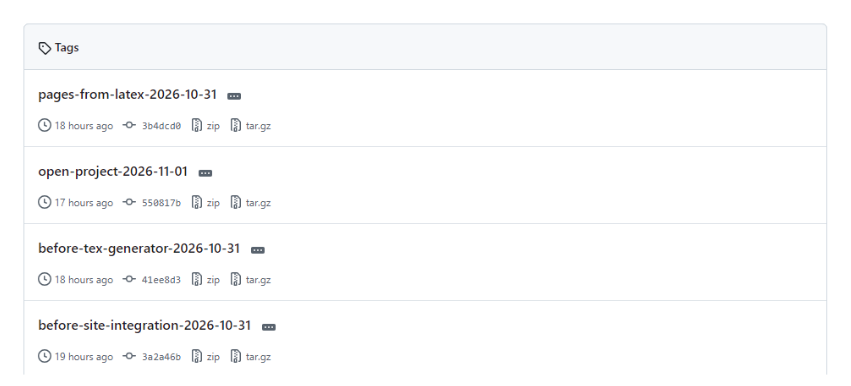
The tags of a public repository on GitHub.
2.3 Going back
You want to |
Use |
|---|---|
See an old version |
|
Undo a commit, keeping the history |
|
Get one old file back |
|
Discard edits you haven't committed |
|
Find which commit broke something |
|
What you should see: looking at an old version
$ git switch --detach submitted-2026-11-01
HEAD is now at 9b0de38 Add the median

$ cat results.txt
The mean is 12.
The median is 11.

$ git switch main
Previous HEAD position was 9b0de38 Add the median
Switched to branch 'main'
Prefer revert over rewriting history. Commands such as git reset --hard and git push --force can destroy work, so check what they do before using them.
2.4 A sensible rule for versions
Keep one working copy of each file under Git, and stop putting versions in file names. For data, which is too large for Git, use dated read-only folders with recorded checksums, as described in the backups chapter.