3. Choose a project and something to change
3.1 Start with something you already use
The best first project is one you use, because you know where it confused you. If it is a tool for your field, you also understand its users. Look at its page on GitHub.
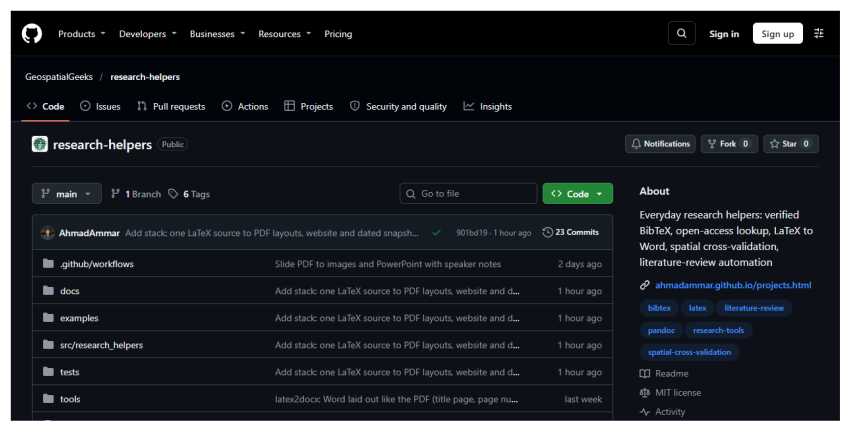
A project’s page on GitHub. The tabs at the top lead to its code, its issues and its pull requests. On the right are its description and licence. The Fork button sits above the file list.
3.2 Check that the project welcomes changes
Before you spend time, check four things on that page. The date beside the most recent files shows whether anyone has been active this year. A Licence on the right shows others are allowed to reuse the code, and open-source projects must have one. A file named CONTRIBUTING.md sets out the project’s rules, so read it first if there is one. And the Pull requests tab shows whether outsiders’ changes get answered.
3.3 Find something small
Press the Issues tab, which lists known problems and requests. Many projects label easy ones good first issue.
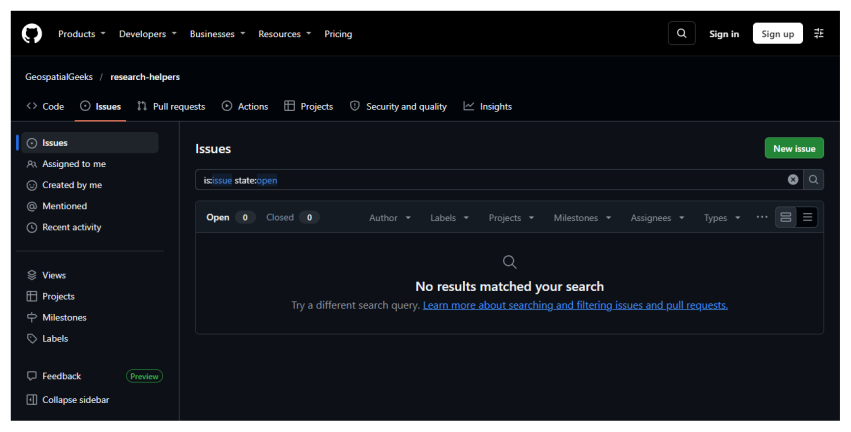
The Issues tab. This project has none open, which is common for small ones. In that case, improve something you noticed yourself.
If you plan a large change, first write an issue describing it and wait for a reply, so that you do not spend days on something the maintainers would not accept. For a spelling fix, you can go straight ahead. If you take an existing issue, leave a comment saying you are working on it, so that nobody duplicates the work.
A useful first change is one a reader could check in a minute. Fix a broken link, correct a mistaken command in the instructions, or add a missing step you had to work out yourself.